
Vertical Phone Screenshot Poster
Camera Create one single 9:16 vertical smartphone-screenshot-style image, with no phone body, device frame, or handheld device visible. Use a half-body composition with the subject…
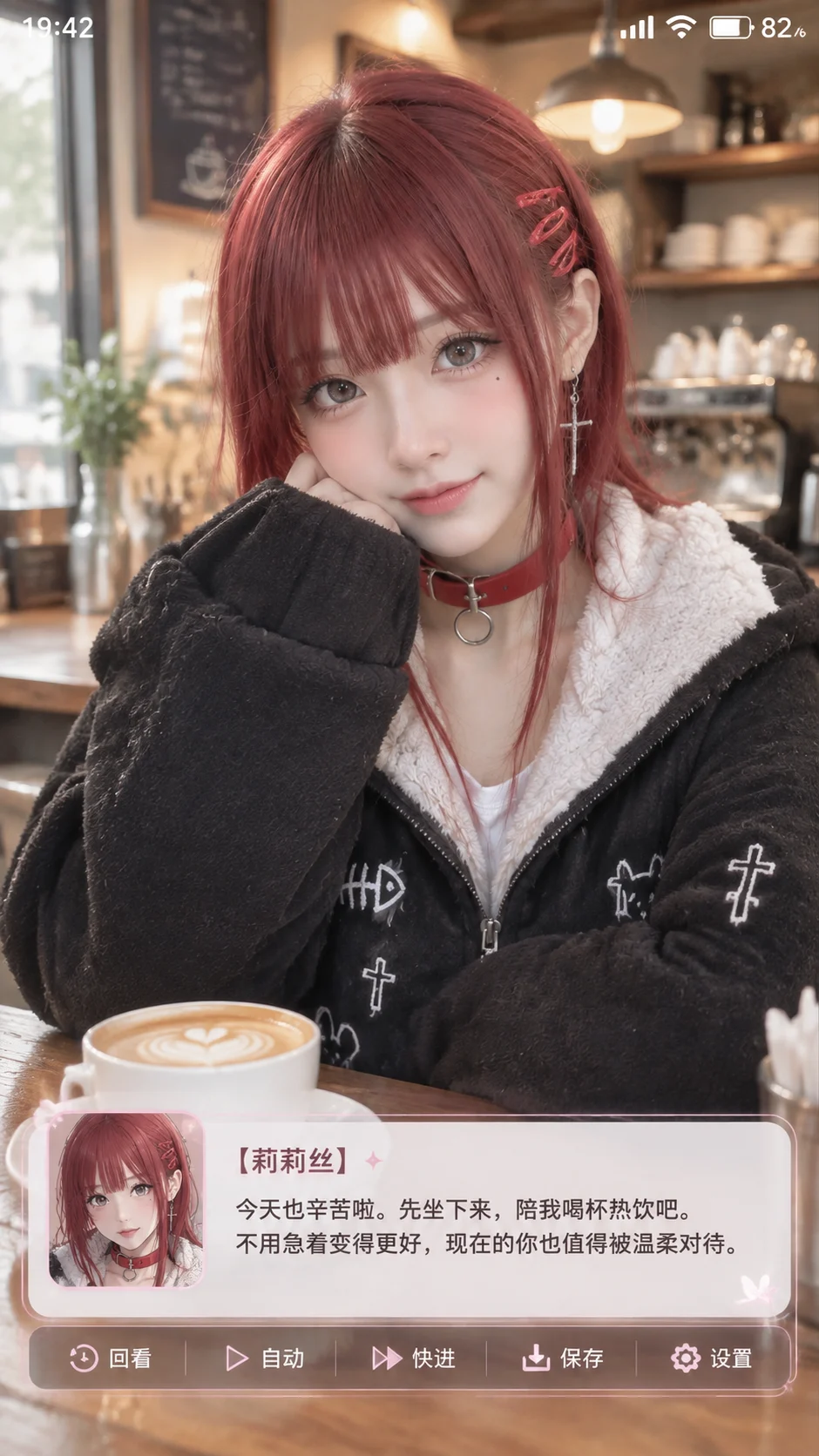
Complete prompt
Camera Create one single 9:16 vertical smartphone-screenshot-style image, with no phone body, device frame, or handheld device visible. Use a half-body composition with the subject centered in the upper portion. Place a status bar at the top and a Galgame dialogue interface at the bottom. Keep the face unobstructed by UI; all text and icons must be clear and legible. Scene A cozy café counter. The subject sits at the counter with a coffee cup on it. Show lamps, cups, saucers, and simple furnishings in the softly blurred background, preserving the café atmosphere. Mix gentle window light with warm indoor lighting. Subject Based on the uploaded anime character reference, show a real-life cosplayer portraying that character. Accurately reproduce the reference's hair color, hairstyle, eye color, clothing, accessories, and signature details. Keep the image primarily photographic, with subtly anime-inspired facial features and slightly enlarged but natural-proportion eyes. Skin should look refined but retain subtle texture. Keep the face, outfit, and key accessories fully visible. Action The subject looks gently toward the camera with a warm, relaxed smile. Add a simple smartphone status bar at the top showing the exact time “19:42” plus signal, Wi-Fi, and battery icons. Keep icon size and spacing consistent; do not show a device frame. Overlay a wide, semi-transparent Galgame dialogue box across approximately the lower quarter of the image. Use a thin light border, softly rounded corners, and clear text contrast. Place an anime portrait of the same character on the left, matching the cosplayer's hair, outfit, and colors. On the right, show the exact larger name label “【角色名字】”. Beneath it, render these two lines exactly: “今天也辛苦啦。先坐下来,陪我喝杯热饮吧。” “不用急着变得更好,现在的你也值得被温柔对待。” Below the dialogue box, arrange “回看”, “自动”, “快进”, “保存”, and “设置” with small, consistent icons and typography. Show all text completely and leave a safe margin at the bottom. Lighting / Color Blend soft, natural portrait photography with a polished anime-game interface. Keep skin tone realistic and clothing and accessories detailed. Let the window light and warm interior lights create gentle depth. The overall image feels clear, cozy, and warm; the UI should not overpower the subject. Negative Prompt Mismatched character features, anime portrait inconsistent with the cosplayer, missing reference outfit or accessories, fully anime-rendered image, plastic skin, excessive smoothing, oversized eyes, malformed anatomy, garbled text, missing characters, typos, duplicated UI, multiple dialogue boxes, dialogue box covering the face, cropped status bar, missing controls, phone body, device frame, watermark.
Results vary by model and settings. Keep the subject and composition, then adjust lighting, materials or background for your own project.
How to customize this prompt in the workspace
- 01
Replace the main subject first
Keep the framing, camera angle, and lighting structure intact while swapping the subject or product description for your own project.
- 02
Lock structure with reference images
Need consistent product geometry, packaging silhouette, or character features? Upload 1 or more reference images with a supported model.
- 03
Refine details via multi-turn editing
Generate a base image first, then use conversational editing to adjust background color, surface reflections, or mood one step at a time.



