
Close Up Selfie Pose
Camera: Create one separate photorealistic portrait in a strict 9:16 vertical close front-camera selfie composition. The face sits near the upper-center, with one arm extending fro…
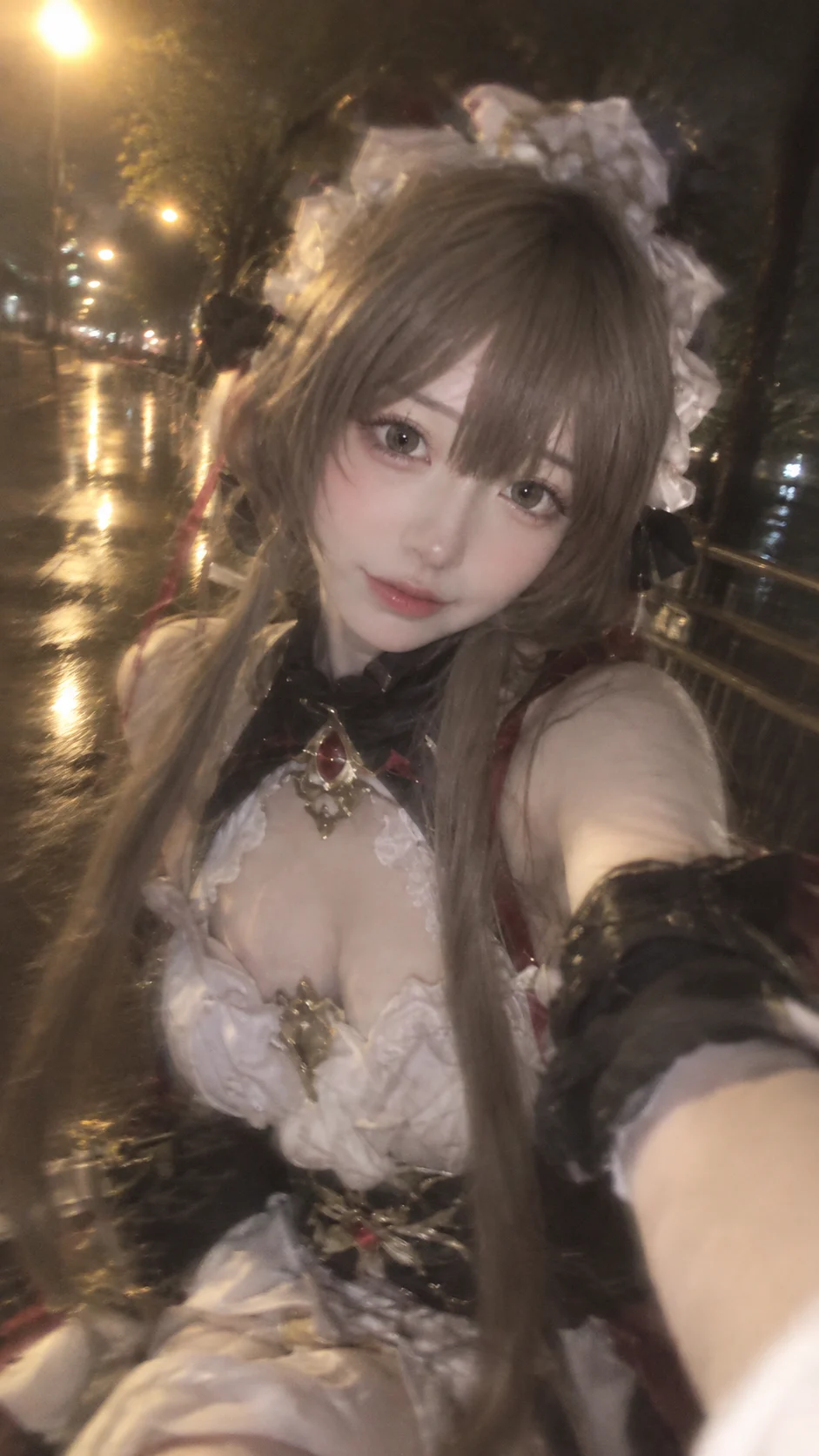
Complete prompt
Camera: Create one separate photorealistic portrait in a strict 9:16 vertical close front-camera selfie composition. The face sits near the upper-center, with one arm extending from the lower-right foreground toward the lens, mild wide-angle perspective, and a natural head tilt. Simulate an early iPhone 5s rainy-night snapshot: low apparent sharpness, uneven soft focus, subtle handheld shake, edge smearing, limited low-light resolution, and slight defocus. The face and costume remain recognizable, but never look like a sharp commercial portrait. Reference roles: Use reference image 1 only for the final face. Extract only its face shape, facial proportions, eyes, brows, nose, lips, skin tone, facial skin detail, makeup, and identity. Do not use image 1 hair, bangs, headwear, earrings, neck, body, clothing, pose, arms, background, or lighting. The final character must have the face from image 1. Use reference image 2 as the complete character base. Preserve its hairstyle, bangs, headwear, earrings, neck, body proportions, clothing, accessories, materials, colors, lace, ribbons, bows, metal fasteners, sleeves, skirt structure, gloves, decoration placement, and every visible character detail. Replace only the face of the character in image 2 with the face from image 1, blending it naturally into image 2’s hairline, hairstyle, headwear, neck, lighting, skin treatment, and character proportions. Image 2 controls the character styling, but its original face must not appear in the final result. Action: Do not preserve the original pose from image 2. The character takes a natural close selfie with one arm extending toward the camera, shoulders and upper body gently leaning toward the phone, slight head tilt, and relaxed expression. Allow natural fabric folds, but preserve the entire hairstyle, headwear, accessories, and costume structure from image 2. Scene: Wet nighttime urban walkway with warm yellow streetlights, trees, railing, and pavement reflections. Keep only hazy tree masses, blurred light blobs, and stretched wet-ground reflections; no sharp buildings, street details, or railing. Lighting / Color: No hard direct flash, studio lighting, or HDR. Warm yellow streetlights enter from the upper-left and distant background, blooming through damp air, lens haze, and wet pavement. Use lifted blacks, low contrast, gray-brown, muted deep green, subdued burgundy, glowing background lights, soft halos around hair, face, and costume edges, mild high-ISO noise, early-phone JPEG compression, lens-fog haze, subtle motion trails, and imperfectly sharp edges. Negative Prompt: Image 1 hair, image 1 headwear, image 1 body, image 1 clothing, image 1 pose, image 2 face, original pose from image 2, facial identity drift from image 1, changed face proportions, altered eye color, missing image 2 hairstyle or headwear, redesigned costume, simplified costume, mixed costume, recolored costume, altered costume structure, wrong aspect ratio, sharp professional-camera look, commercial-ad clarity, hard direct flash, modern HDR, sharp background, malformed fingers, extra limbs, text, logos, watermarks.
Results vary by model and settings. Keep the subject and composition, then adjust lighting, materials or background for your own project.
How to customize this prompt in the workspace
- 01
Replace the main subject first
Keep the framing, camera angle, and lighting structure intact while swapping the subject or product description for your own project.
- 02
Lock structure with reference images
Need consistent product geometry, packaging silhouette, or character features? Upload 1 or more reference images with a supported model.
- 03
Refine details via multi-turn editing
Generate a base image first, then use conversational editing to adjust background color, surface reflections, or mood one step at a time.



