
Pastel Blue Bedroom Portrait in Window Light
Camera Create a photorealistic 9:16 vertical indoor portrait from a high angle, slightly tilted toward the subject's face. Avoid wide-angle distortion. Full-frame camera, 85mm lens…
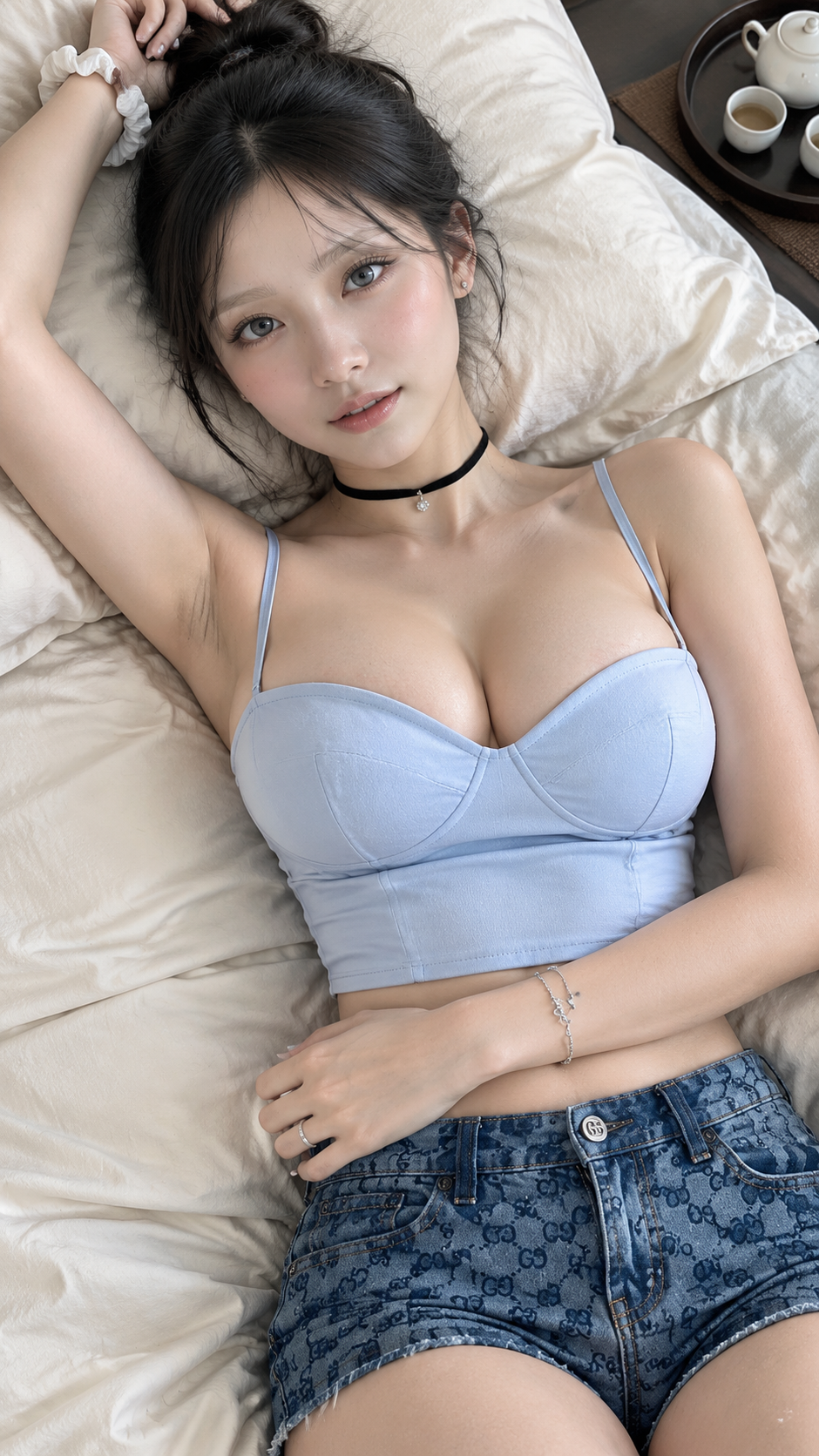
Complete prompt
Camera Create a photorealistic 9:16 vertical indoor portrait from a high angle, slightly tilted toward the subject's face. Avoid wide-angle distortion. Full-frame camera, 85mm lens, approximately 1.8 m distance, f/3.2, ISO 200, 1/200 sec. Frame from her head to above the hips, keeping the top and shorts fully visible with natural proportions. Focus on the eye closest to camera; keep the eyes and top sharp, with bedding softly out of focus. Scene A simple, refined bedroom. The subject lies on softly rumpled ivory bedding and pillows. In the upper-right of the frame, place a dark round tray on a textured brown surface, holding a small white ceramic tea set. Keep the setting restrained and uncluttered. Subject A young adult East Asian woman with a slender but realistic build and a light neutral skin tone with natural tonal variation. Her oval face has subtle natural asymmetry and realistic cheek fullness. Use sheer makeup that preserves pores, soft peach blush, brown mascara and eyeliner, taupe eyeshadow, and glossy nude lipstick. Her eyes look naturally lively, with low-saturation neutral gray-blue irises showing fine stromal fibers and subtle color flecks; the limbal ring is nearly invisible. Keep the sclera natural, with faint veins and a subtle lower waterline. Long black hair in a half-up bun with a slight wave and a few natural flyaways at the hairline. Action She lies relaxed on her back and looks directly at the camera with a soft, serene expression. Tilt her head slightly toward the left side of the image. Her right arm reaches above her head, fingertips lightly touching her hairline; her left arm bends across her torso, with her left hand resting on her abdomen. She wears a fully lined, opaque powder-blue cropped bustier with an elegant sweetheart neckline, structured cups, and refined waist seams, showing a small area of midriff. Pair it with blue denim shorts featuring restrained navy or indigo double-G jacquard motifs oriented correctly, with no extra lettering. Add a thin black velvet choker with a small pendant, tiny stud earrings, a simple ring, a white fabric scrunchie on her right wrist, and a delicate bracelet on her left wrist. Keep garment construction complete and natural. Lighting / Color Soft, directional 5200K window light enters through a sheer curtain from camera-right at about 45 degrees and slightly above the subject. Ivory bedding provides gentle fill approximately 1.5 stops below the key light. Preserve natural facial contours, nose-and-lip shadows, and catchlights without glow or light spill. Use realistic neutral tones with powder blue, restrained indigo, ivory, and soft brown accents; avoid cyan color casts and oversaturation. Meter for the cheekbones and preserve garment highlights. Output 1440×2560, sRGB. Negative Prompt Doll-like appearance, BJD, porcelain or plastic skin, childlike proportions, oversized or anime eyes, enlarged irises, glassy eyes, bright cyan or icy-blue irises, obvious limbal ring, unnaturally white sclera, poreless skin, excessive smoothing, excessive shine, Orton glow, soft-focus effect, HDR skin, frequency-separation blur, excessive symmetry, CGI, 3D render, illustration, cartoon shading, wide-angle facial distortion, perspective distortion, transparent or wardrobe-malfunction clothing, exposed underbust or sideboob, twisted anatomy, extra fingers, malformed hands, incorrectly oriented double-G pattern, garbled or misspelled logo, text, watermark.
Results vary by model and settings. Keep the subject and composition, then adjust lighting, materials or background for your own project.
How to customize this prompt in the workspace
- 01
Replace the main subject first
Keep the framing, camera angle, and lighting structure intact while swapping the subject or product description for your own project.
- 02
Lock structure with reference images
Need consistent product geometry, packaging silhouette, or character features? Upload 1 or more reference images with a supported model.
- 03
Refine details via multi-turn editing
Generate a base image first, then use conversational editing to adjust background color, surface reflections, or mood one step at a time.



